ScreenGlimpse
ScreenGlimpse
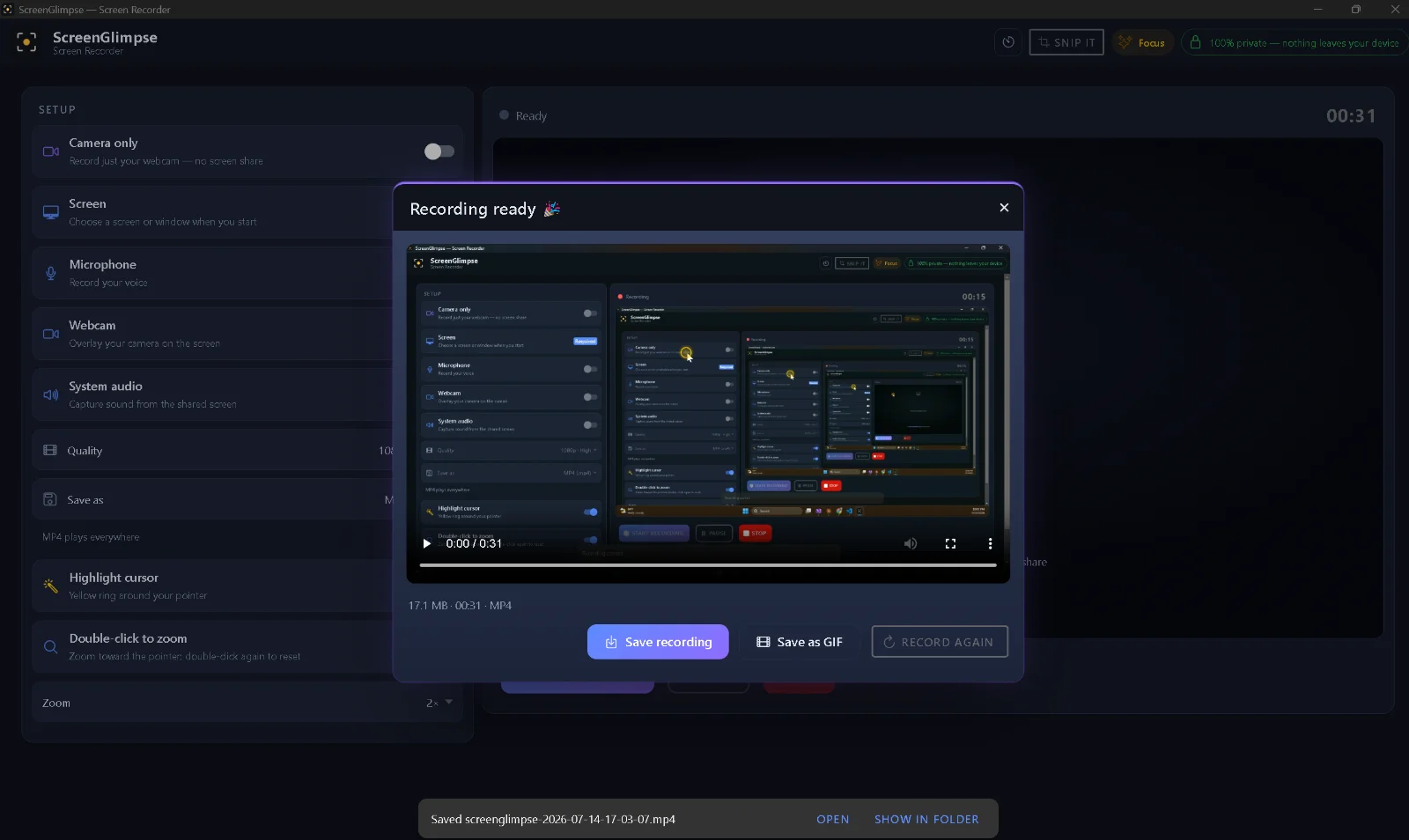
ScreenGlimpse is an innovative screen recorder designed to make your recordings look professional and directed, not just captured. It automatically highlights your cursor and zooms into every click, ensuring viewers never lose focus. Operating entirely on your device, ScreenGlimpse prioritizes privacy and speed, making it ideal for creating tutorials, demos, and collaborative content.
Key Features
- Automatic cursor highlighting and click-to-zoom for enhanced clarity.
- Entirely local recording and processing – nothing is uploaded.
- No account required for the free tier; works fully offline.
- Multi-platform support: Windows, macOS, Linux, and a browser version.
- Capture screen, mic, webcam (draggable bubble), and system audio simultaneously.
- Instant MP4 or WebM export the moment you hit stop, with no render queues.
- Collaborative Drawingboard for live, shared sketching with up to 7 participants.
Use Cases
ScreenGlimpse excels in scenarios where visual communication is paramount. For educators and trainers, it simplifies the creation of clear, engaging tutorials and how-to guides, ensuring every step is highlighted and understood. Technical support teams can leverage it to quickly demonstrate solutions or troubleshoot issues, reducing back-and-forth communication. Furthermore, the integrated Drawingboard transforms brainstorming and design collaboration. Teams can sketch ideas live on a shared canvas, with named cursors showing who's drawing what in real-time. This peer-to-peer collaboration ensures privacy, as strokes travel directly between participants without touching ScreenGlimpse servers, making it perfect for sensitive projects or remote team synchronization.Pricing Information
ScreenGlimpse operates on a freemium model. The "Glimpse" tier is free forever, offering unlimited local recordings and up to 720p export with core features. The "Focus" plan, priced at $5/month or $50/year, unlocks up to 4K export, advanced markup tools, and removes watermarks. For live collaboration, the "Collaborate" plan is available at $8/month or $80/year, enabling shared Drawingboard sessions. A "Forever" one-time purchase of $100 provides all Collaborate features and a year of updates without subscription. Discounted rates are available for organizations with 10+ users.User Experience and Support
ScreenGlimpse is designed for ease of use, emphasizing a seamless experience with no account required for its free tier. Its local processing ensures recordings are fast and private. The FAQ section addresses common questions regarding privacy, accounts, and platform support. The interface is intuitive, allowing users to quickly start recording and utilize features like cursor highlighting and zoom without a steep learning curve. Support options are accessible via the website.Technical Details
All core functionalities, including recording, cursor highlighting, zooming, and video encoding, occur locally on the user's device. This ensures maximum privacy and eliminates the need for uploads or server-side processing for recordings. The collaborative Drawingboard feature utilizes peer-to-peer encrypted connections, meaning drawing strokes travel directly between participants, with ScreenGlimpse servers only handling connection metadata. It's available as native installers for Windows, macOS (Intel & Apple Silicon), and Linux, alongside a convenient browser-based version.Pros
- Strong emphasis on user privacy with local-only recording.
- Automatic cursor highlighting and click-to-zoom enhance clarity.
- Instant video export without rendering delays.
- Cross-platform compatibility (Windows, macOS, Linux, Web).
- Real-time, peer-to-peer collaborative whiteboard.
- Generous freemium tier with no account required.
Cons
- Collaboration feature requires a paid tier for the session initiator.
- Limited to 7 participants for collaborative sessions.
- No advanced in-app video editing features beyond basic capture and markup.
- New Windows installs may trigger SmartScreen warnings initially.
Conclusion
ScreenGlimpse offers a powerful, privacy-first solution for screen recording and visual communication. Its unique automatic focus features and collaborative tools make it an indispensable asset for anyone looking to convey information clearly and efficiently. Explore ScreenGlimpse today to transform how you show, rather than explain.Comments
Publisher

Launch Date2026-10-16
Platformweb
Pricingfreemium
Tech Stack
#web
Outbid
View🥇 🥈
🥈 🥉
🥉
Want this spot? Pay what you wantBoost Your Domain Rating — DoFollow Backlinks (DR 30–70) from $30
Raise your Ahrefs Domain Rating with 5 - 50 dofollow backlinks from DR 30–60 sites — from $50, guaranteed to improve your DR or your money back.
$45
DirEasy - The Best Directory Boilerplate with AI | DirEasy
The best directory boilerplate, packed with AI, Listings, Payment, Submission, CMS, Blog, Authentication, Newsletter, SEO and more.
$41
Submit Your Startup to 100+ Directories | Submitator
Automated startup directory submission service. Get listed on Product Hunt, BetaList, Indie Hackers & 100+ directories for SEO backlinks and DR boost. From $29.
$40